The self-custodial wallet with no seed phrase to manage.
Sign in with Google or email, and your wallet is protected and recoverable. Your keys stay on your device, and you see exactly what you sign.
Free. For Chrome and Edge. Your keys never leave your device.
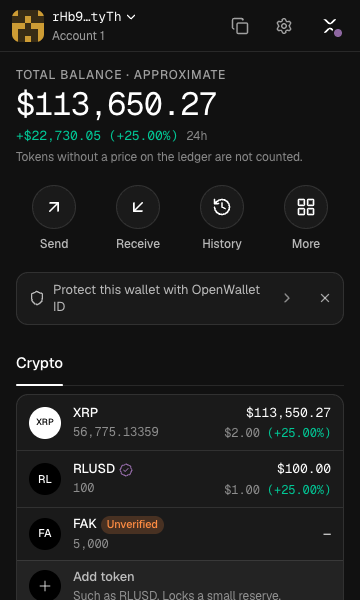
Yours to hold, easy to recover, clear to sign.
A wallet only you control should not depend on a piece of paper. OpenWallet keeps your keys on your device and gives you a way back that is not a seed phrase.
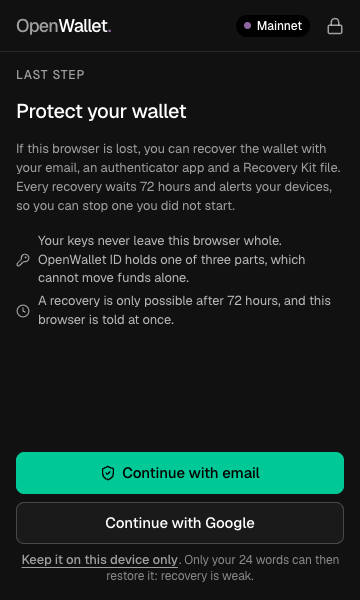
No seed phrase to manage.
Protect your wallet by signing in with Google or email and an authenticator app, and keep a small Recovery Kit file. Lose this browser and you get your wallet back on a new device. Every recovery waits 72 hours, and your email and your other devices are told, so nobody can finish one quietly. Your 24 words still exist; you can export them from Settings whenever you want them.
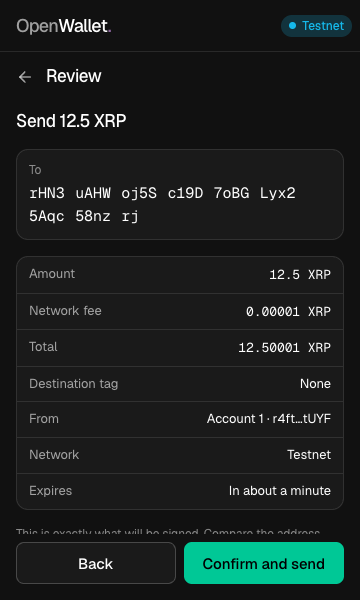
You see what you sign.
The wallet decodes the exact bytes it is about to sign and shows you that. The full address, the amount, the fee, the network and when it expires. A signature covers only the payment on that screen.
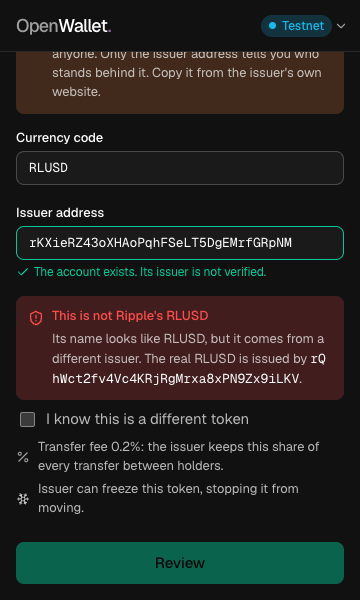
Know who issued what you hold.
Anyone can issue a token with any name, so the wallet shows the issuer. Known stablecoins from their real issuers carry a verified badge, a lookalike from anyone else gets a plain warning, and the wallet says when an issuer can freeze a token or take it back.
A wallet for your AI agents.
Connect an AI app to OpenWallet and it can pay for what you ask it to fetch, from a separate wallet with limits it cannot raise. Every payment is shown to you in the extension and signed on your device. The agent never chooses where money goes, and you can lose at most what you put in its wallet.
# Add this as a remote MCP server in your AI app
https://mcp.openapps.network/mcp

# Then approve the connection in OpenWallet:
# Agents → Approve a connectionFour steps, and your keys stay on your device for all of them.
OpenWallet is a browser extension. Its key code runs inside it, and your keys never leave it.
Add it to your browser
Install the extension in Chrome or Edge and pin it to the toolbar.
Create a wallet
Choose a password. The wallet makes your keys on this device and encrypts them with it.
Protect it
Sign in with Google or email, add an authenticator app, and save your Recovery Kit. That is your way back.
Send and receive
Check the address, amount, fee and network on a screen read back from what will be signed.
In your browser, and in your AI apps.
The wallet lives in the extension. AI apps connect to it, and every payment they make comes back to the extension for you to approve.
Remote MCP
Connect any AI app that supports remote MCP servers, on the web, desktop or phone.
Connect an AI appmcp.openapps.networkOpenWallet Agent
A local MCP server for AI apps that run programs on your Mac, such as Claude Code.
Set it upmacOSYour keys never leave your device. Nothing else is collected.
What goes where, in full.
Stays on your device
Your keys, your password and your 24 words. The wallet is encrypted with your password, and the unlocked key lives only in the extension's memory until it locks.
Goes to OpenWallet ID
Your email, your authenticator secret, and one of three parts of your wallet, encrypted. One part alone cannot rebuild a wallet or move funds.
Goes to the ledger
Balance reads and the transactions you sign. OpenWallet supports the XRP Ledger: XRP, RLUSD and other tokens issued on it.
Never collected
No analytics, no crash reports and no remote code in the extension. These pages run no scripts and set no cookies.
OpenWallet never asks for codes on a website. Type email and authenticator codes only inside the extension.
Free. The ledger charges its own small costs.
There is no paid plan. What you pay goes to the network, not to OpenWallet.
Network fee
About 0.00001 XRP per payment at normal load. The wallet sets it and shows it before you sign.
Account reserve
The XRP Ledger keeps 1 XRP locked in every account, plus 0.2 XRP for each token it holds. Removing an empty token releases its 0.2 XRP.
OpenWallet ID and agents
Free. The agent program and the merchant library are public source.
What people ask before they trust a wallet.
- Does OpenWallet hold my money?
- No. Your keys are made and kept on your device, encrypted with your password. OpenWallet cannot move your funds.
- Do I have to write down a seed phrase?
- You do not have to manage one. Once your wallet is protected with OpenWallet ID, your sign-in, your authenticator app and your Recovery Kit restore it. Your 24 words still exist, and you can export them from Settings at any time.
- What happens if I lose my computer?
- Install OpenWallet on a new device, load your Recovery Kit and sign in. After a 72-hour safety wait, which your email and your other devices are told about, the wallet is back.
- Will anyone ask me for a code?
- Only the extension. OpenWallet never asks for codes on a website. Type email and authenticator codes only inside the extension. Anyone asking for a code, your recovery code or your Recovery Kit on a website, by email or by message is not OpenWallet.
- Can an AI agent spend my money?
- Only from a separate agent wallet you fund, within limits you set, and only payments you approve in the extension. You can lose at most what you put in it.
- Which networks and tokens does it support?
- The XRP Ledger: XRP, RLUSD and any other token issued on it. RLUSD and USDC from their real issuers carry a verified badge.
A wallet you hold, with a way back you can actually use.
This site never asks for your wallet password, recovery code or recovery kit.
Free. For Chrome and Edge. Your keys never leave your device.